Orders
When a customer buys in chat, the order appears on the Orders page. You confirm it, ship it and mark it delivered, and the customer hears about each step in the chat.
Who can do this: everyone on your team. Only owners and admins can mark an order paid or record a refund. Orders is for shops only.
1 Confirm the order
New orders wait under To confirm. Open one, check the items and address, then select Confirm order.
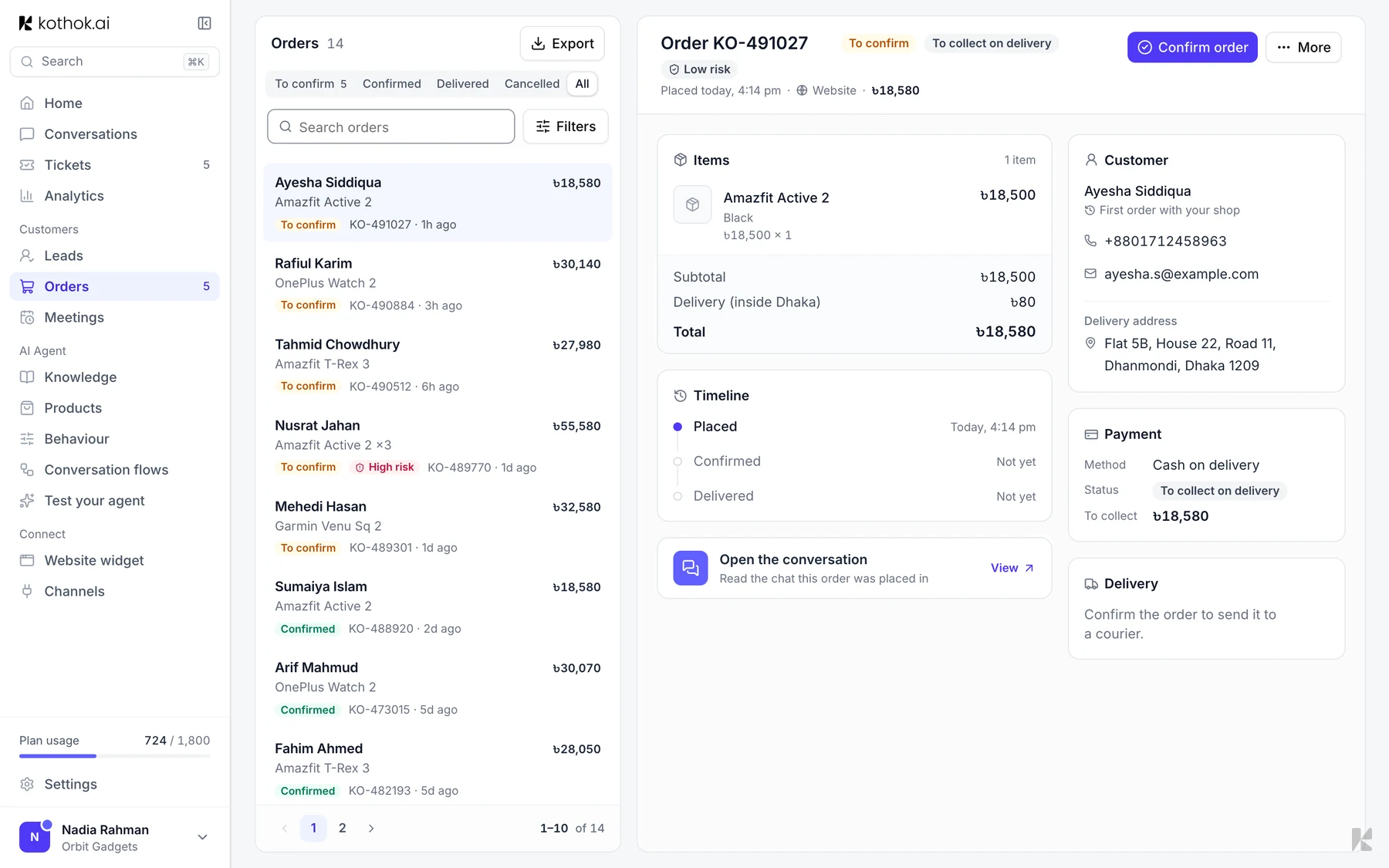
2 Check the payment
Kothok never takes the money. For bKash, Nagad or a payment link, check the transaction ID the customer sent, then select Mark paid.
3 Send it to a courier
Select Send to courier and choose Steadfast or Pathao. Connect a courier first under Products → Delivery.
4 Mark it delivered
When the parcel arrives, select Mark delivered.
Export orders
Owners and admins can select Export, pick the dates, status and payment, then select Email export. Kothok emails an Excel file to your business email address.
Good to know
- To cancel, select More, then Cancel order. You can't undo it.
- If an order is flagged High risk, call the customer before you confirm.
If something goes wrong
The customer wasn't told. On WhatsApp, Messenger and Instagram you can only message a customer within 24 hours of their last message.